Manage Claude Code's context window like a whiteboard. Stay focused, keep it clean, and capture what matters before you wipe it.
Last year, I used Claude Code to build a Chrome extension. It was the time that I haven't incorporated any context and cost engineering in my project. Forty minutes in, Claude started writing code that went against instructions I had given 15 minutes earlier. It started to "forget" things it knew. The context indicator showed I had 3% context usage left until compaction. I had used up most of my budget without noticing, and the output quality dropped fast.
That single session burned through my daily usage limit. Before I learned to manage context properly, I was hitting both daily and weekly caps in a single sitting, then waiting around for limits to reset.
If you hit a session limit on Claude subscription, your usage is temporarily paused for some hours, on rolling window - depending on your subscription tier and your usage.
To continue, you can enable "Extra Usage" to pay per message, upgrade to a higher tier like the Max plan for more capacity, or use API tokens for pay-per-token-use.
After learning proper context management, the same feature development took 20 minutes in a fresh session with room to spare.
The difference between those two outcomes is context engineering. It is the skill that separates productive daily usage and accurate responses from constantly hitting rate limits and low quality outcome.
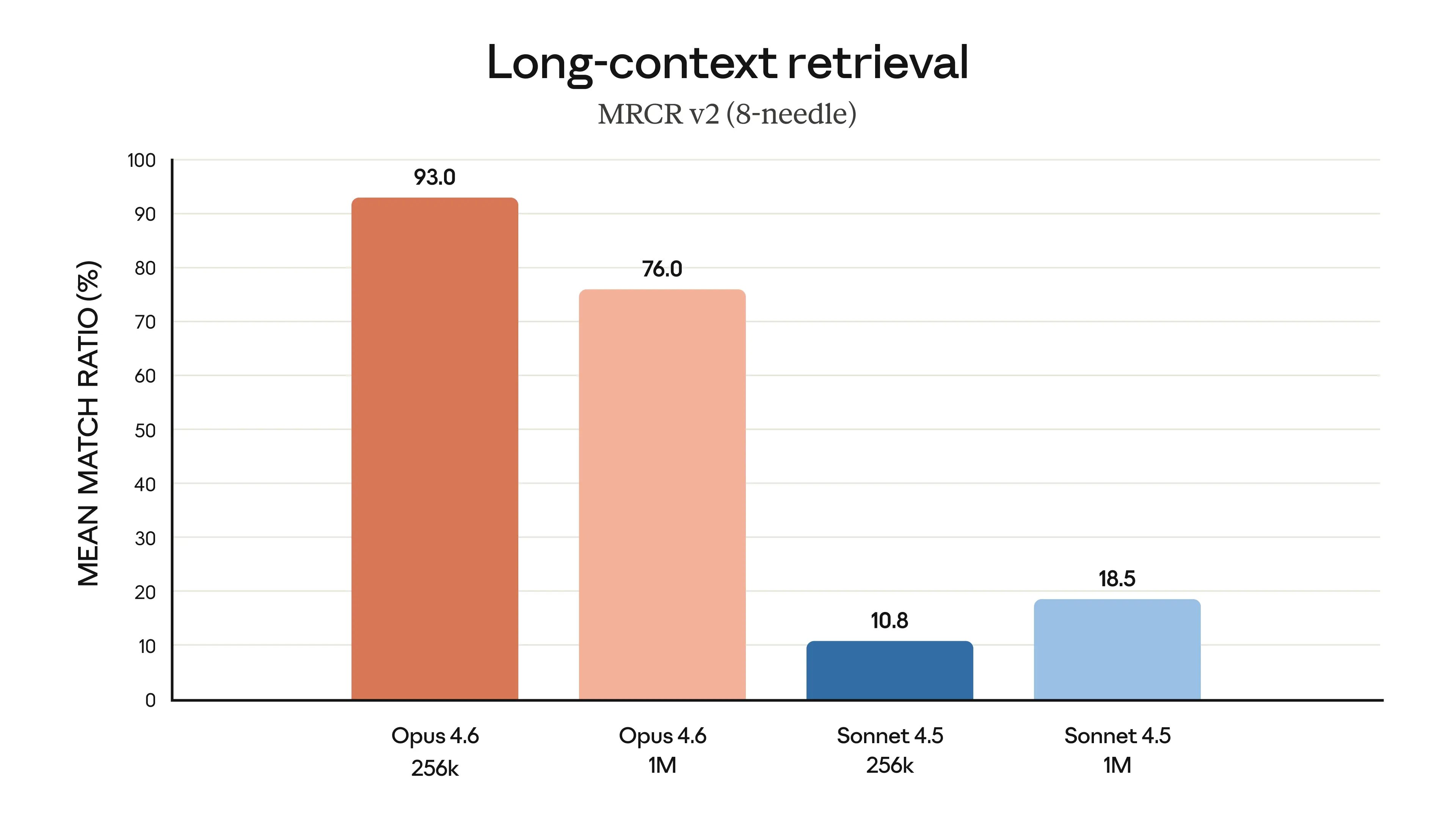
What I ran into has a name: context rot. As the context window fills up, the model gets worse at finding and following earlier instructions. Researchers test this with needle in a haystack evaluations. The idea is simple: hide a specific fact (the needle) inside a large block of unrelated text (the haystack), then ask the model to find it. The results are clear. Both the model you choose and how much context you use change the outcome. Opus 4.6 finds 93% of needles at 256K tokens, but drops to 76% at 1M tokens. Sonnet 4.5 only manages 10.8% at 256K and 18.5% at 1M.
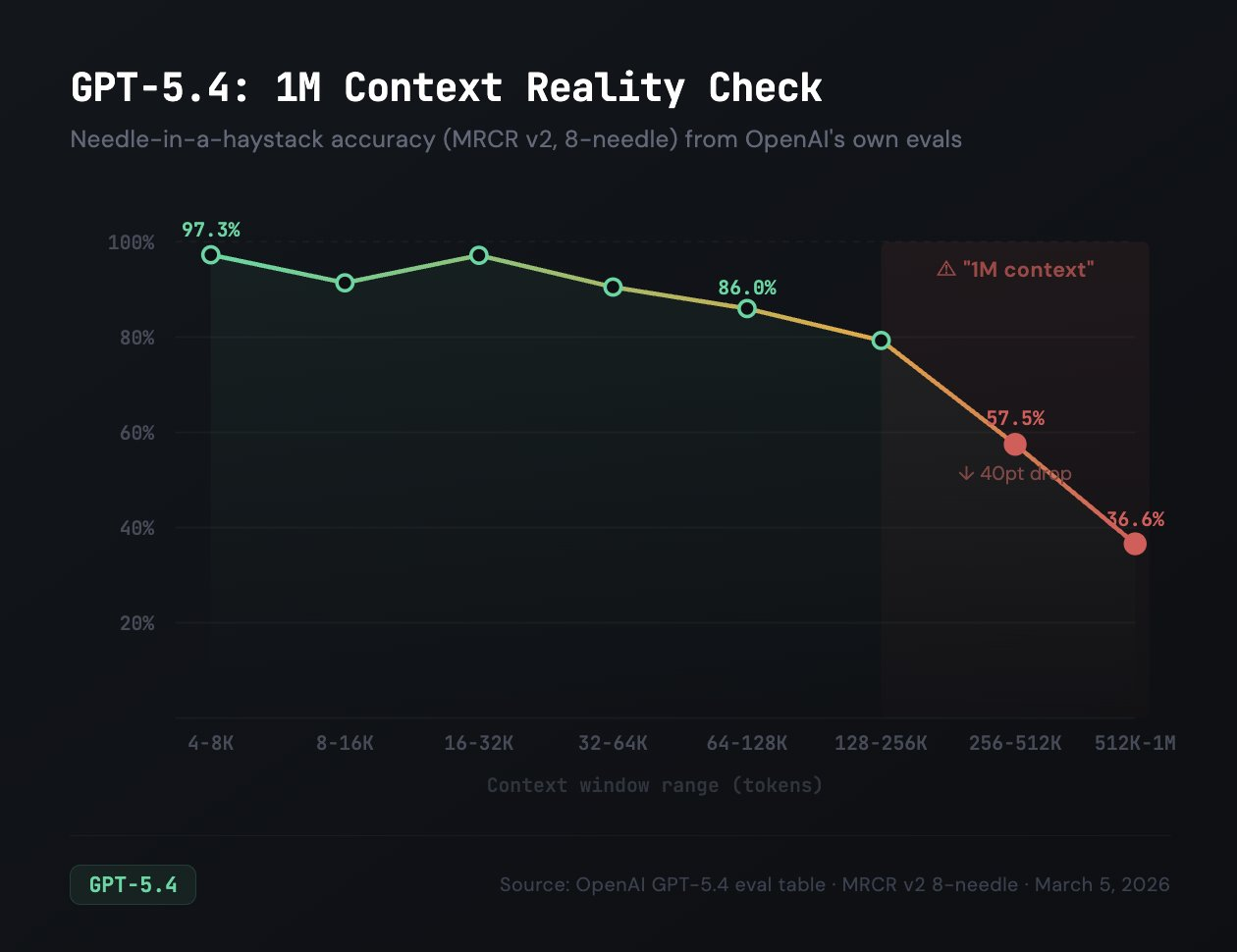
Independent tests from Cline back this up. As Claude Opus, GPT also has a 1M context window, but their evals show that needle-in-a-haystack (MRCR v2) scores 97% at 16-32K tokens, drops to 57% at 256-512K, and just 36% at 512K-1M.
Once context goes past roughly 32K tokens, output quality starts dropping depending on the model you use and its context window.
So, what does it really mean to use 1M context window? How should you choose a model for a certain type of task? Is it a good idea to compact regularly? What compaction actually means and what does it do to your context?
Context is not a technical detail you can ignore until something breaks. It is the main resource you manage when working with Claude Code. Every choice you make about what to load, when to clear or shorten, and how to structure sessions comes from understanding this budget.
Draft - In Progress. This chapter is currently being written. Full content coming soon.
8. The Complete SDLC Workflow
Follow a structured Research, Plan, Implement, Review, Ship workflow that consistently produces production-grade code.
10. Commands, Skills, and Capstone
Build a library of reusable commands and skills that automate your workflows, then build a complete feature end-to-end.