Understand what AI coding agents actually are and why they matter to your engineering career right now.
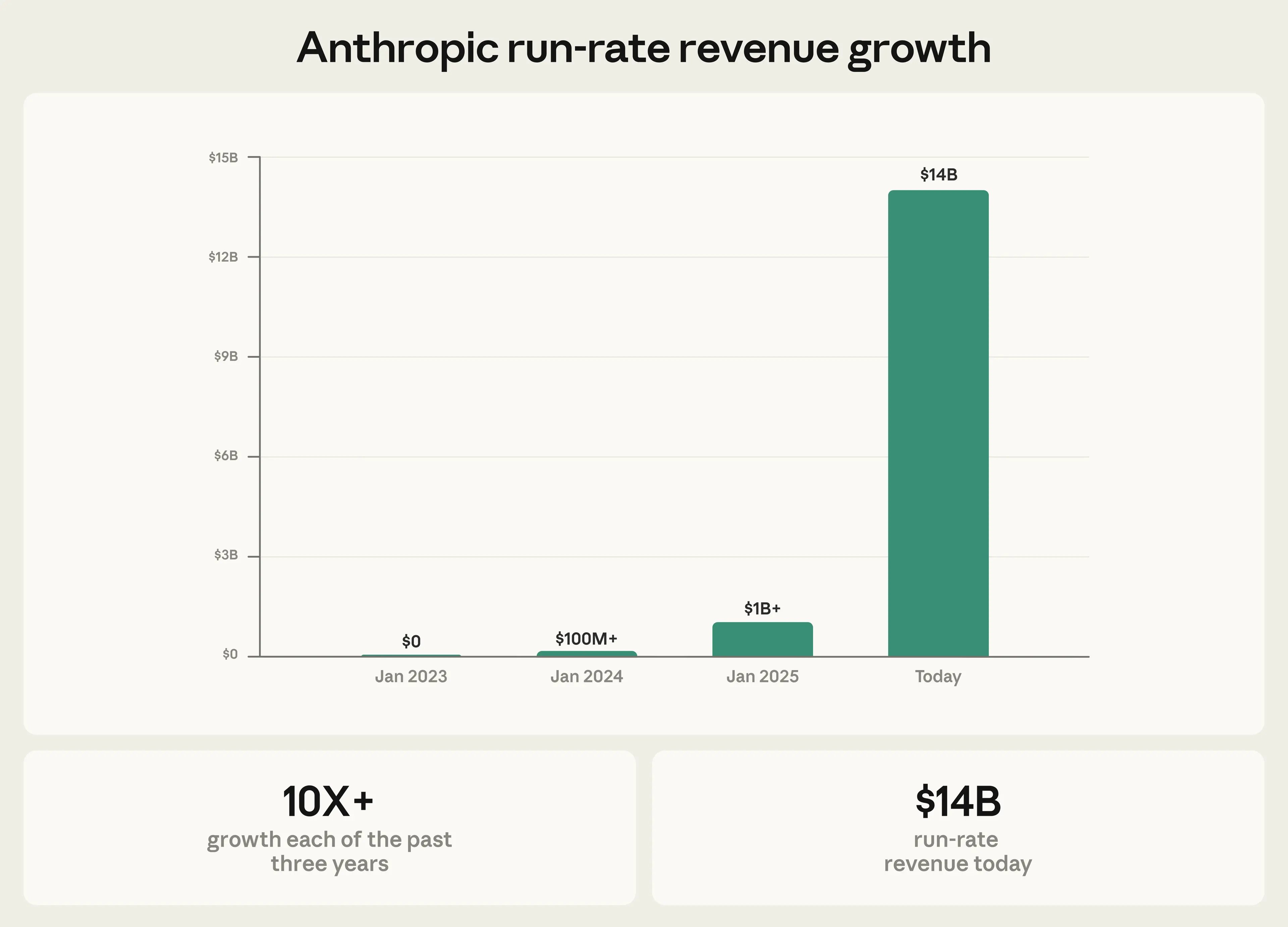
As of early 2026, Claude Code’s run-rate revenue has grown to over $2.5 billion, more than doubling since the start of the year. That is faster than Slack, faster than Figma, faster than almost any developer tool in history. The velocity tells you something: this is not a hype cycle. Engineers are paying real money because the tool produces real results.
MIT Technology Review named "Generative Coding" one of its 10 Breakthrough Technologies of 2026. Their conclusion after 30+ interviews with engineers and researchers: AI coding tools are not replacing developers. They are changing what development work looks like.
Yet here is the gap. A 2024 Stack Overflow survey found that 52% of engineers fear AI will displace their role, while only 26% have received any structured training on AI coding tools. That is a big gap between anxiety and meaningful action. If you are reading this, you are closing that gap right now.
Andrej Karpathy, the former head of AI at Tesla, called this moment a "phase shift" in software engineering. His point was specific: the nature of coding itself is changing, but the need for engineers who understand systems, architecture, and quality is not going away. It is intensifying.
The engineers who thrive are the ones who learn to orchestrate AI, not the ones who try to outtype it.
There are two paths forward. You become the engineer who directs AI agents to ship production software over 10x speed. Or you compete against engineers who master the tools that brings such an efficiency to the industry. The first path is more interesting, also more lucrative.
They write better instructions, think through an extensive implementation plan, design tighter feedback loops, and verify output with the discipline of a Principle Engineer / Tech Lead. A traditional engineer opens an editor and starts typing. A Claude Code native engineer opens a terminal, describes the outcome they need, clarifies the technical specification they wish, sets up verification, and lets the agent iterate.
This is a new skill set. It is also a learnable one.
Boris Cherny, the creator of Claude Code, revealed in January 2026 that 100% of his recent contributions (259 pull requests, 40,000+ lines of code in 30 days) were written by Claude Code paired with Opus 4.5. He runs 5 terminal sessions simultaneously, each in a separate git checkout.
That is a production workflow shipping code to millions of users. The chapters ahead teach you a similar system.
Before you can direct an AI coding agent effectively, you need to understand the six concepts that govern how it behaves. These are not theoretical. Each one directly affects the quality of code Claude produces for you.
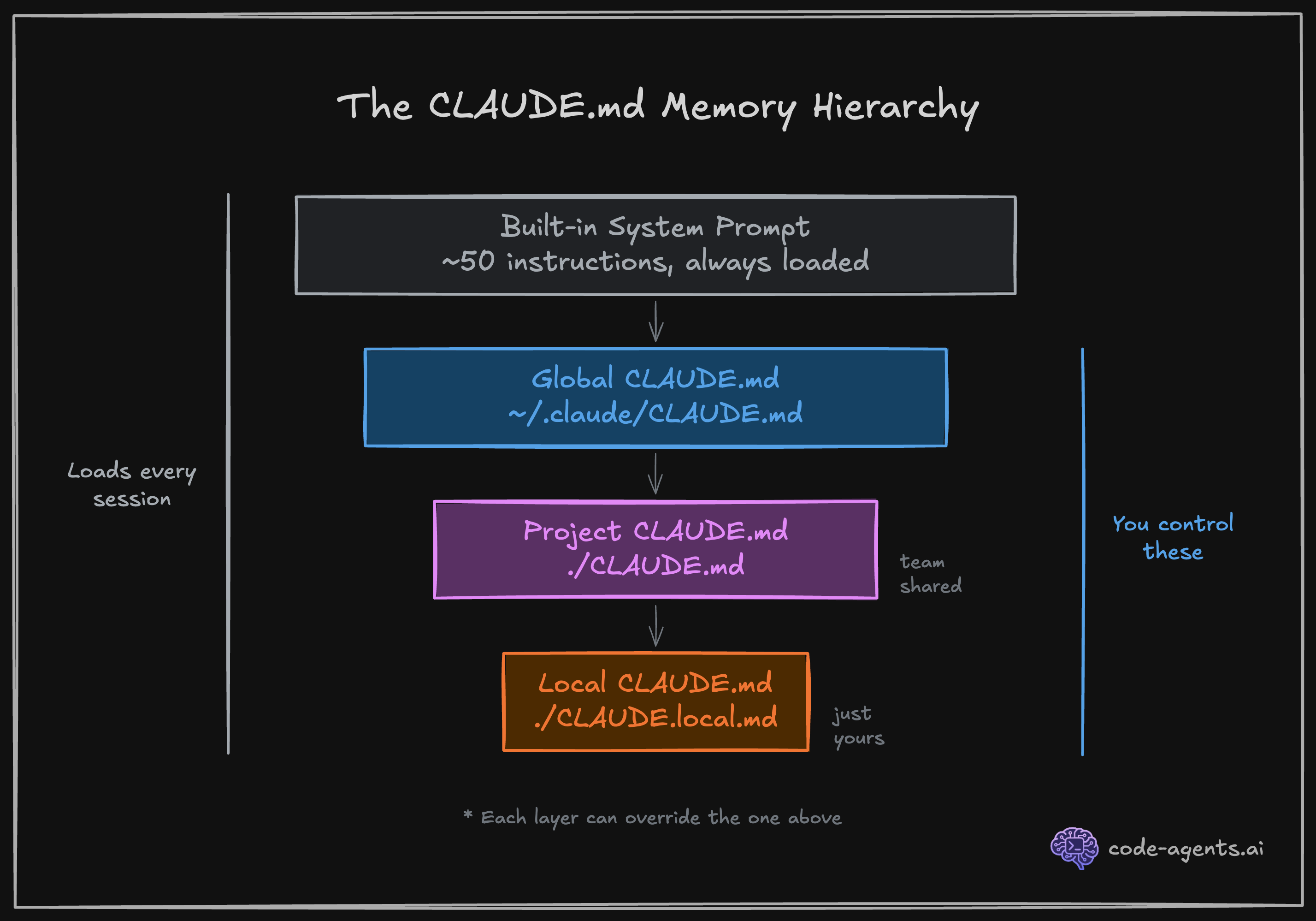
Every time you launch Claude Code, it loads a system prompt containing roughly 50 built-in instructions. These tell Claude how to behave: read files before editing them, prefer small changes, ask for clarification when a request is ambiguous.
Your CLAUDE.md file extends this system prompt with project-specific instructions. When you write "Never use inline styles, always use Tailwind utilities" in your CLAUDE.md, that instruction carries the same weight as the built-in ones. Understanding this hierarchy is the foundation of effective Claude Code usage.
1. Built-in system prompt (~50 instructions from Anthropic)
2. Global CLAUDE.md (~/.claude/CLAUDE.md) - your personal preferences
3. Project CLAUDE.md (./CLAUDE.md) - team instructions, checked into git
4. Local CLAUDE.md (./CLAUDE.local.md) - your local overrides, gitignoredYou will build your own CLAUDE.md in Chapter 3. For now, know that this file is the single most important lever you have over output quality.
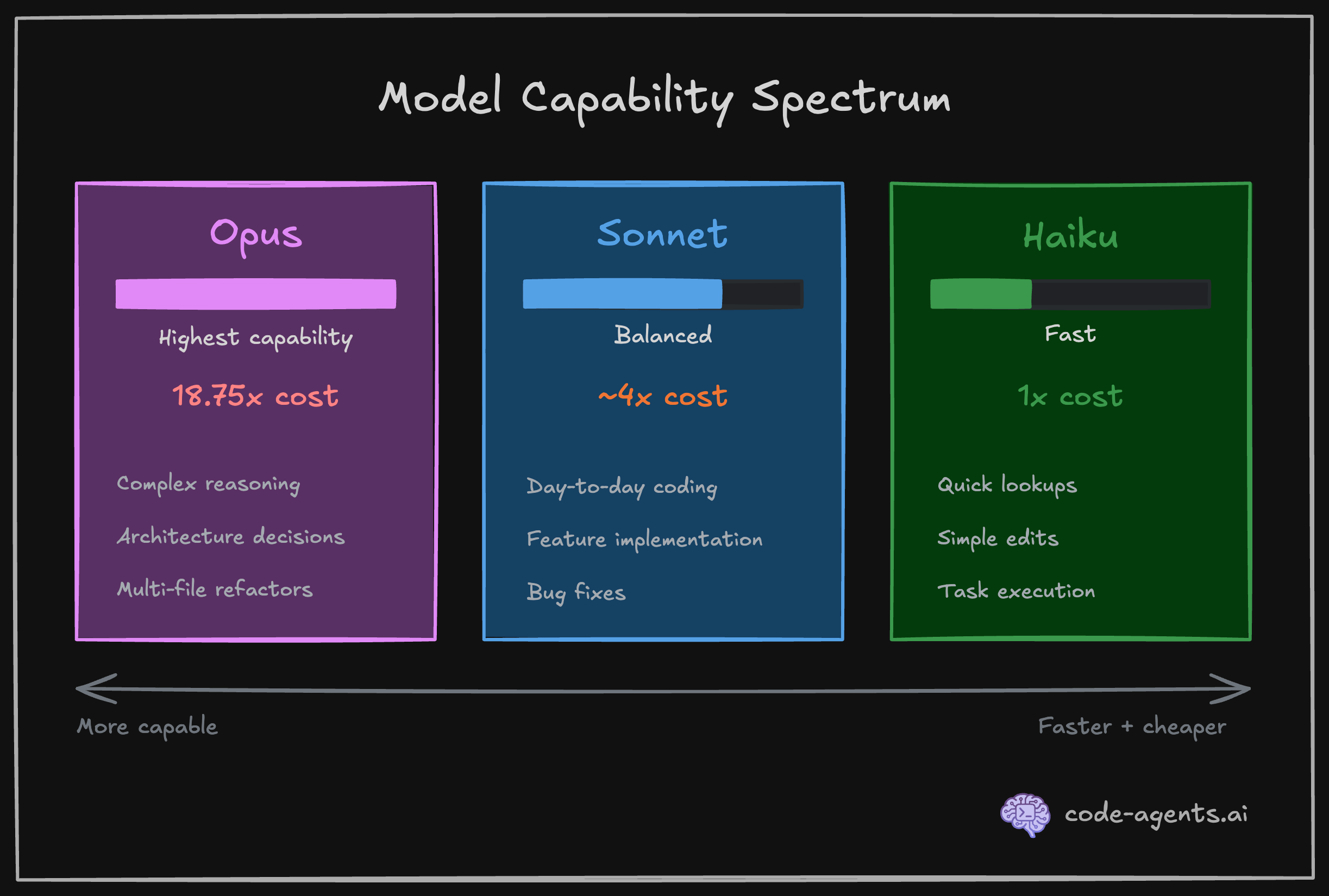
Claude Code uses different AI models for different tasks. The three you will encounter are Opus, Sonnet, and Haiku. They sit on a spectrum.
| Model | Strength | Relative cost | Use case |
|---|---|---|---|
| Opus | Highest capability, deepest reasoning | 18.75x Haiku | Complex architecture, multi-file refactors |
| Sonnet | Strong balance of speed and quality | ~4x Haiku | Day-to-day coding, planning, implementation |
| Haiku | Fastest, cheapest | 1x (baseline) | Quick file searches, simple lookups, task executions |
The 18.75x cost difference between Opus and Haiku is not a rounding error. It means a $5 task on Haiku costs $93.75 on Opus. Claude Code manages model selection automatically in most cases, using Haiku for its built-in Explore subagent and Sonnet for general tasks.
You will learn when to override these defaults, and configure models for your own subagents and skills in Chapter 9.
The context window is the total amount of text (memory) Claude can "hold in mind" during a single session. For Claude Code, that budget is approximately 1M tokens, roughly equivalent to 500 to 2,500 pages of text.
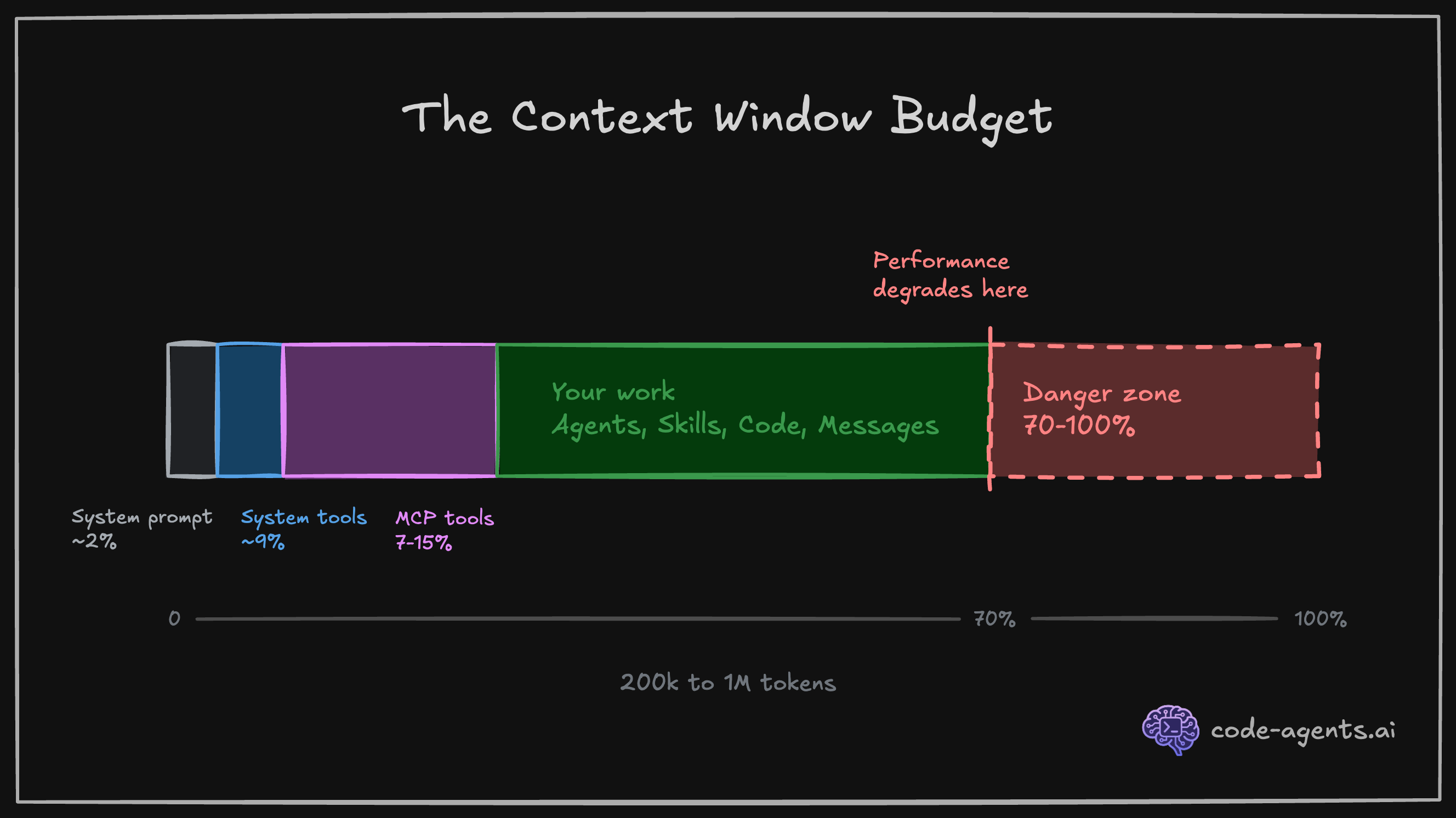
Here is why this matters: everything consumes context. The system prompt, your CLAUDE.md, every file Claude reads, every command output, every message you send, and every response Claude generates. When the context fills up, Claude starts forgetting earlier instructions. Performance degrades noticeably above 60-70% usage.
# Check your current context usage at any time
# Type this in your Claude Code session:
/context
Think of context as the condition of characters in Memento, or 50 First Dates movies. The main characters in those movies have a condition of short-term memory loss. They should be reminded again and again in every "session" about past memories, learnings, and knowledge. Current context window limitations of AI models are quite similar to the short-term memory loss condition, so you need to note and tell important topics when needed for every session.
As the codebase grows, the context window limit becomes a real issue, and requires a special attention. Chapter 9 covers context management in depth.
Claude Code is not a chatbot. It is an agent harness (explained in detail in the next chapter). The difference is tool calling in a loop. When Claude needs to read a file, it does not guess at the contents. It calls the Read tool and gets the actual file. When it needs to run your test suite, it calls the Bash tool and executes the command.
The core capabilities Claude has and the tools Claude Code uses:
| Category | What Claude Code can do |
|---|---|
| File operations | Read files, edit code, create new files, rename and reorganize |
| Search | Find files by pattern, search content with regex, explore codebases |
| Execution | Run shell commands, start servers, run tests, use git |
| Web | Search the web, fetch documentation, look up error messages |
| Code intelligence | See type errors and warnings after edits, jump to definitions, find references |
See the complete list of built-in tools here.
Every tool call consumes context tokens. A large file read can consume thousands of tokens. This is why Claude Code's effectiveness depends on targeted, precise tool usage rather than reading your entire codebase into memory.
Claude Code does not remember the details of previous sessions by default. Each new session starts with a blank slate and brief memories, plus whatever your CLAUDE.md files provide. This is by design: it keeps sessions fast and predictable.
When you reach your context limit in your session, Claude automatically compacts the context. It summarizes the session to a short brief, and starts a new session with it to continue the work. You could also strategically compact your session with session, or persist memory and progress across the sessions. You will learn more about this skill in Chapter 9.
# Compacts the current session - similar to auto-compact behavior that is triggered when you're about to reach your context limit
/compact

# Compact with additional instructions - to not miss important details and key aspects from the session
/compact "<optional custom summarization instructions>"

# Starts a new session (! Destructive to your context in your active session)
/newThe memory hierarchy works in three layers:
~/.claude/CLAUDE.md): Your personal preferences across all projects./CLAUDE.md): Team instructions, committed to version control./CLAUDE.local.md): Your personal project overrides, automatically gitignoredSkills and slash commands provide on-demand memory. Unlike CLAUDE.md, which loads every session, skills load only when relevant, saving precious context tokens for the work that matters. You will create your first skill in Chapter 4.
"AI Slop" is the industry term for AI-generated content that is perceived as lacking in effort, quality, or meaning, and produced in high volume.
In software engineering, AI-slop is a bulk of code that looks correct on first glance but contains subtle bugs, hallucinations, unnecessary abstractions, redundant duplications, dead code or logic holes.
Karpathy's critique is precise: LLMs "don't manage their confusion, don't seek clarifications, don't surface inconsistencies."
The data backs this up. GitClear's 2024 analysis documented an 8x increase in code duplication when teams adopted AI coding tools without verification workflows. That is not AI making engineers worse. That is engineers accepting AI output without proper verification guardrails.
AI-generated code without verification is a liability. AI-generated code with verification is a superpower.
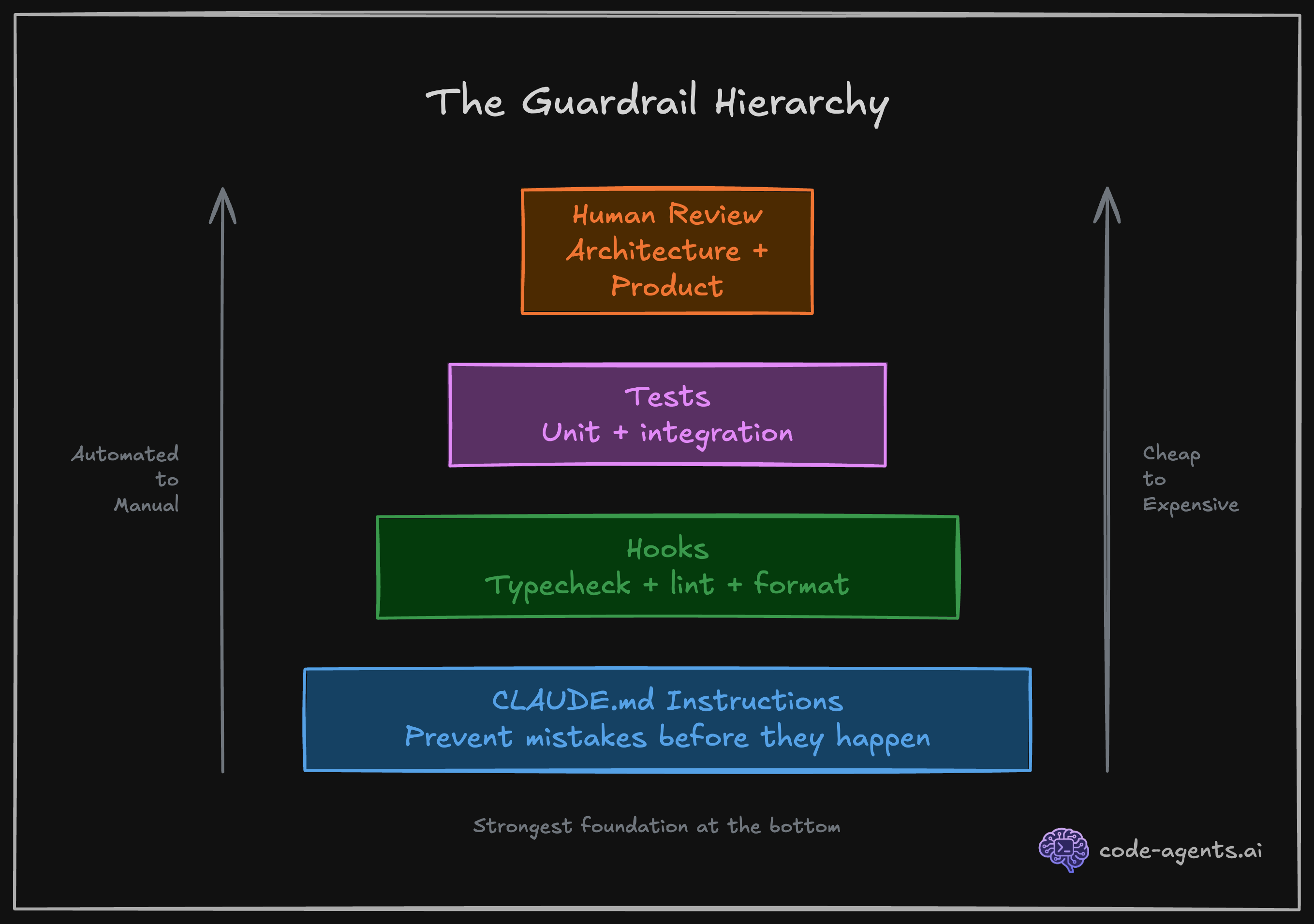
The antidote is systematic verification: compilation, linting, testing, and AI/human review. Every chapter in this course builds verification into the workflow and extends them, not as an afterthought, but as the primary mechanism for quality.
I have tried many workflows for working with AI coding agents. The mental model that consistently produces the best results is simple: A coding agent is a fast intern with short-term memory and no experience. And, you're the nit picky Tech Lead that rigorously guards the code and product quality.
A fast intern can execute tasks at incredible speed, hold a chunk of codebase in working memory, and follow your instructions to the letter.
But they will not push back on a bad architecture decision. They will not notice that your test is asserting the wrong thing. They will not tell you the requirements are contradictory.
Having AI agents that mass produce code for you in minutes does not mean you can skip the software engineering practices or any steps of the software development lifecycle. These paradigms are proven across decades of practice in hundreds of industries.
Say you are building a small startup team of humans. You would invest in systems that enable your team to deliver reliably and fast. The same applies when your team includes AI agents, and especially to them as they're very good at producing code - fast.
| Practice | Why it matters | How it applies to AI agents |
|---|---|---|
| Version control | Every change is traceable, reversible, and reviewable | Agents commit frequently. You review diffs, not generated files |
| Automated testing | Catches regressions before they reach users | Tests are the guardrail that validates agent output at machine speed |
| Code review | A second pair of eyes catches logic errors and design drift | Both you and the agents are the reviewer. Every diff gets inspected |
| Continuous integration | Broken builds surface immediately, not days later | CI runs on every agent-produced commit so failures are caught in multiple lines of defense |
| Small, incremental changes | Smaller diffs are easier to review, test, and revert | Break agent tasks into focused units. One task, one concern, one PR |
| Clear specifications | Ambiguous requirements produce ambiguous output - garbage in garbage out | Write precise technical instructions. Agents follow them literally, including errors |
| Separation of concerns | Modules with clear boundaries are easier to change and test independently | Agents work better in small, well-scoped files and modular architectures |
| Observability | You cannot fix what you cannot see | Give agents access to logs, errors, and runtime feedback to self-correct |
Claude does not manage its own confusion. If your instructions are ambiguous, Claude picks an interpretation and runs with it. If two of your CLAUDE.md rules contradict each other, Claude follows one and ignores the other without flagging the conflict.
Your job is not to write code. Your job is to give the intern clear instructions, the right tools, and a way to check its own work.
The shift from "writing code" to "designing systems that produce correct code and guard the product quality" is the core transformation of this course.
Here is a concrete example.
You write everything yourself:
// Traditional: Manual implementation
export async function POST(req: NextRequest) {
  const body = await req.json();
  const { email, name } = body;

  // TODO: Add validation
  // TODO: Check auth
  // TODO: Handle errors properly

  const supabase = createClient();
  const { data, error } = await supabase
    .from('profiles')
    .insert({ email, name });

  if (error) {
    return Response.json({ error: 'Failed' }, { status: 500 });
  }

  return Response.json(data);
}
What's missing: Input validation, auth check, proper error handling, rate limiting, tests.
You describe the production requirements:
Create a POST /api/profile endpoint with these specs:

**Validation** (use /input-validation skill):
- email: valid format, max 255 chars
- name: 2-100 chars, required
- Return 400 with field-specific errors if invalid

**Security**: (use /security-review skill when done)
- Require authenticated user (Supabase Auth)
- Return 401 if not authenticated
- Use RLS to ensure users only update their own profile

**Error handling** (use /error-handling skill):
- 400: Validation errors with specific field messages
- 401: Not authenticated
- 409: Email already exists
- 500: Database errors with safe user message

**Testing** (use /tdd):
- Unit test: Zod schema validation edge cases
- E2E test: successful profile creation
- E2E test: duplicate email rejection
- E2E test: unauthenticated request blocked

Run tests after implementation and fix any failures.The AI-Native spec takes a couple of minutes to write but requires focus, attention, reasoning and thorough thinking. Combined with the plan mode of Claude Code, it's what makes the requirements crystal clear. Claude produces: route handler with proper validation, auth checks, error handling, 4 comprehensive tests, and runs the test suite to verify everything works. Traditional approach: min 20-30 minutes to match the same production quality, and you'd likely skip the duplicate email test.
Verification workflows are the number one force multiplier when working with AI coding agents. Not better prompts. Not bigger context windows. Not more capable and expensive models. The ability for Claude to check its own work, and iterate until the checks pass, is what separates useful output from slop.
Boris Cherny stated it directly:
"Probably the most important thing to get great results is to give Claude a way to verify its work. If Claude has that feedback loop, it will 2-3x the quality of the final result."
As we use a non-deterministic tool (LLMs / AI agents) to build deterministic solutions (reliable programs), we must complement the non-deterministic nature of the tooling with the deterministic means of verification.
The forms of verification you will set up in this course:
Verification scripts Claude will run:
# Compiler catches type errors, hallucinations
npm run compile

# Linter catches code quality issues
npm run lint

# Build verification catches build-time issues
npm run build

# Unit tests catch logical errors
npm run test:unit

# Integration tests catch runtime integration issues
npm run test:integration

# End-to-end tests catch breaking user journeys and visual regressions
npm run test:e2e
Hooks run automatically after Claude uses a tool. No manual step, no forgotten check:
{
  "hooks": {
    "PostToolUse": [
      {
        "matcher": "Write|Edit",
        "hooks": [
          {
            "type": "command",
            "command": "npx prettier --write $CLAUDE_FILE_PATH"
          },
          {
            "type": "command",
            "command": "npm run typecheck 2>&1 | head -20 || true"
          }
        ]
      }
    ],
    "Stop": [
      {
        "hooks": [
          {
            "type": "agent",
            "prompt": "Verify that all unit tests pass. Run the test suite and check the results. $ARGUMENTS",
            "timeout": 120
          }
        ]
      }
    ]
  }
}
Every file Claude writes or edits gets auto-formatted and typechecked before it moves on. And, every session is validated by a custom agent. You set this up once in Chapter 5.
Skills are on-demand verification workflows Claude invokes when deemed fit, or you manually invoke:
# Full project verification: typecheck, lint, format, tests
/verify

# Review all uncommitted changes for logic errors and design drift
/review-changes

# Run and debug a specific failing E2E test with full evidence collection
/debug-test checkout-redirect.spec.ts

# Simplify recently changed code for clarity without changing behavior
/code-simplifier

# End-of-session cleanup: remove debug statements, unused imports, leftover artifacts
/cleanup
Each skill loads a focused set of instructions only when called, keeping context lean. You build your first skill in Chapter 4 and chain them into full SDLC workflows by Chapter 8.
Subagents are specialized Claude instances that run in parallel, each with a focused role:
You are a Test-Driven Development agent.
Write failing tests FIRST based on the spec.
Never write implementation code.
Run the test suite and confirm all new tests fail
for the expected reasons before stopping.You are an implementation agent.
Read the failing tests. Write the minimum code
to make them pass. Do not modify tests.
Run the test suite after every change.
Stop when all tests pass.You are a code review agent.
Review all uncommitted changes for: security issues,
logic errors, naming inconsistencies, and violations
of the project conventions in CLAUDE.md.
Report findings by severity. Do not modify code.Agents with focused responsibilities, running simultaneously in separate sessions. You configure subagents in Chapter 8.
MCP (Model Context Protocol) servers extend Claude's capabilities with external tools and data sources:
# Open a URL in Chrome, take screenshots, get logs, fill forms, extract data
/browser https://staging.myapp.com

# Search up-to-date library documentation and code examples
"How do I set up Supabase RLS for multi-tenant apps?"
# Claude automatically queries Context7 MCP for current docs

# Query your Supabase database directly from Claude
"Show me all users who signed up in the last 7 days"
# Claude uses Supabase MCP to run the query
Installed MCPs:
| MCP Server | What it does |
|---|---|
claude-in-chrome | Browser automation on user's active browser session: navigate, click, screenshot, fill forms, extract data |
context7 | Up-to-date library documentation and code examples for any framework |
supabase | Direct database queries, auth inspection, RLS testing |
playwright | Headless/headful browser automation in isolation |
MCPs give Claude eyes and ears for extensive verification (browser screenshots and logs), memory (databases), and current knowledge (live docs). You connect your first MCP in Chapter 6.
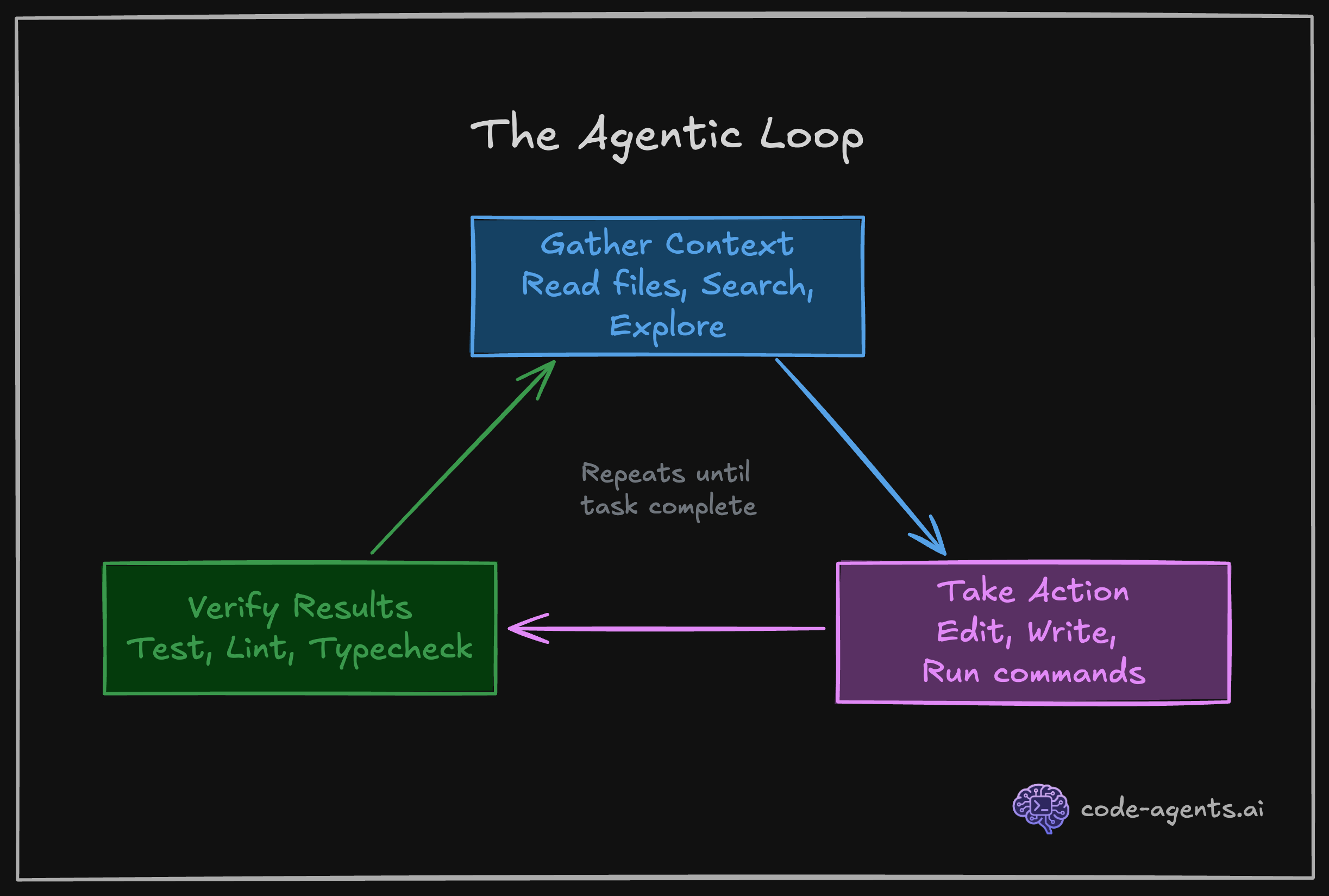
When Claude has access to these tools and instructions to run them at the right time, it enters a self-correcting loop. Write code, check it, fix what broke, check again. This is the three-phase agentic loop in action: gather context, take action, verify results.
Cherny's workflow reveals a critical insight about how to structure your work with Claude Code. He runs 5 terminal sessions simultaneously, each working on a separate, focused task in its own git checkout.
Why does this work better than one long session? Context. A single session handling multiple tasks bleeds context between concerns. Your API refactor context mixes with your test-fixing context mixes with your documentation-writing context.
By 70% context usage, Claude is juggling too many threads and quality degrades.
Five focused sessions, each at 30% context usage, will outperform one session at 90% every time. This pattern, parallel simple sessions over serial complex sessions, becomes second nature by Chapter 8.
Treat context like working memory, not like a file cabinet. Keep it focused, keep it fresh, keep it sacred.
The difference between a frustrated engineer and a productive one is not the agent. It is the system around the agent.
When Claude makes a mistake, you have two choices. First choice: complain about AI limitations, restart the session, hope it does better next time. Second choice: update your system so that specific mistake cannot happen again.
The second choice compounds. Each session teaches you something about where your workflow breaks down. Each breakdown should be encoded into a CLAUDE.md rule, a hook, a skill, or an agent instruction. Over time, the mistakes stop repeating. The efficiency loss decreases. Your system becomes rock-solid.
Here is what this looks like in practice:
| Session insight | System update | Result |
|---|---|---|
| Claude keeps using inline styles instead of Tailwind | Add to CLAUDE.md: "NEVER use inline style={{}}. Always use Tailwind utilities." | Claude uses Tailwind consistently in all future sessions |
| Claude claims completion but tests are failing | Add Stop hook running npm test when Claude signals completion | Tests run automatically; Claude sees failures and fixes them |
| Claude claims tests are passing and failures are not related to the current session | Update /verify skill that verifies all tests regardless of the session, and debugging failures | Claude corrects its false claim next time the tests are executed; you catch reasoning drifts |
| Claude forgets project structure by mid-session | Create a project-structure skill with Files component showing key directories | Load /project-structure when context gets fuzzy; Claude reorients instantly |
This is not theory. I maintain this course platform the same way. Every time Claude does something I did not want, I instruct Claude to correct its instructions caused the mistake and update CLAUDE.md and/or relevant skills with a /self-heal skill. You'll see how in the next chapters.
After many iterations, most sessions complete without a single correction from me. The agent has not gotten smarter. The systems has gotten tighter.
Your frustration with AI agents is a signal. It tells you exactly where to invest 5 minutes of system-building that saves hours in every future session.
The mental model shift: Treat every mistake as a one-time tuition payment. You pay the cost of fixing it now. You encode the fix into your system. You never pay that cost again.
By Chapter 10, you will have a complete system: CLAUDE.md conventions, verification hooks, SDLC skills, specialized agents, and a workflow that compounds quality across every session. Each chapter adds one more layer of automation, one more guardrail, one more way for Claude to check its own work.
The engineers who thrive are not the ones who tolerate AI limitations. They are the ones who systematically eliminate them.
You are the nit picky Tech Lead. Claude is your fast intern with short-term memory and no experience.
Come back to this page until you digest the mental model.
| Principle | What it means | What you do |
|---|---|---|
| Short-term memory | Claude holds up to 200K-1M tokens of context at once, and it gets reset often | Front-load the right context via CLAUDE.md and targeted file reads and skills |
| No experience | Claude will not catch architectural mistakes or question bad patterns unless its told | You set the direction. Claude executes |
| Fast execution to context rot | Claude reads, writes, and runs commands in seconds and fills up the context | Break work into small, verifiable tasks to take advantage of speed and shorter context window |
| Literal instruction-following | Claude does exactly what you say, including when you are wrong | Be precise in instructions. Ambiguity produces inconsistent output |
| No self-awareness of confusion | Claude picks an interpretation instead of asking for clarification | Add explicit "if unclear, ask before proceeding" to critical instructions |
| Limited memory (if auto-memory is on) across sessions | Each session starts fresh unless you provide context files | Invest in CLAUDE.md, your memory structure and skills so Claude sessions can be informed |
The six concepts that govern agent behavior:
| Concept | Core insight | Chapter deep-dive |
|---|---|---|
| System prompts | CLAUDE.md instructions carry the same weight as built-in Anthropic instructions | Chapter 3 |
| Models | Opus costs 18.75x Haiku. Match model to task complexity | Chapter 9 |
| Context window | Everything consumes tokens. Performance degrades above 60-70% usage | Chapter 9 |
| Tool calling | Claude executes real actions (read, write, run, search) in a loop | Chapter 2 |
| Memory | Four layers: global, project, local, session. Skills are on-demand memory | Chapter 3 |
| Slop | AI output without verification is a liability, not a feature | Chapter 5 |
The three-phase agentic loop:
Five forms of verification:
| Form | What it does | When it runs |
|---|---|---|
| Scripts | Compile, lint, build, test | On demand or via hooks and skills |
| Hooks | Auto-format and typecheck after every file edit | Automatically after tool use |
| Skills | On-demand SDLC workflows (/verify, /review-changes, /debug-test) | When invoked by you or Claude |
| Subagents | Specialized agents (TDD, implementer, reviewer) with focused roles | When invoked by you or Claude |
| MCPs | Browser screenshots, live docs, database queries | Automatically when context demands |
Rules of engagement:
The cheat sheet above is your reference card. Return to it whenever a session feels unproductive. The answer is almost always one of these six concepts or one of these six rules.
You now have the mental model that separates engineers who struggle with AI agents from engineers who direct them.
You are the Tech Lead. Claude is your fast intern. Everything that follows builds on that frame.
You have the mental model, but mental models do not ship code. What actually happens when you type claude and press Enter? What tools does the agent have? How does the system prompt get assembled? Chapter 2 opens the hood and maps the internal architecture of Claude Code, so you can predict what it will do before it does it.
How is this chapter?