Understand the agent harness architecture and predict what Claude Code will do before it does it.
I was watching Claude Code work on a bug fix in my open-source project when I noticed something. It read 16 files, searched for a pattern across the codebase, proposed a fix, edited two files, ran the test suite, saw a failure, adjusted the fix, and ran the tests again. All before I finished my coffee.
That sequence was not random, it was an architecture. Every step followed a pattern I could predict once I understood how the agent works. Then I found something that made everything click: the actual system instructions that govern Claude Code's behavior has been shipped with the transpiled npm package. There are over 110 prompt pieces, and they explain every decision Claude makes during a session.
Claude Code is built on what Anthropic calls an "agent harness." This is the infrastructure layer that turns a language model into a coding agent. The language model alone can generate text, understand images and call tools. The agent harness gives the model the capabilities it needs through the tools; the ability to read your project files, execute commands, edit code, and verify its own work in a loop.
Without understanding the agent harness, everything feels magical. Once understood, they become predictable.
You cannot predict a coding agent's behavior, debug its mistakes, or optimize your workflow if you don't understand what happens behind the scenes. When Claude refuses a command, reads files in a specific order, or delegates work to a system subagent, you have no framework for understanding why. You are dependent on trial and error.
The architecture is simple. Three phases, a handful of tools, multiple iterations in loops, and 110+ system prompt pieces, and you as the driver of this engine tell Claude exactly how to behave.
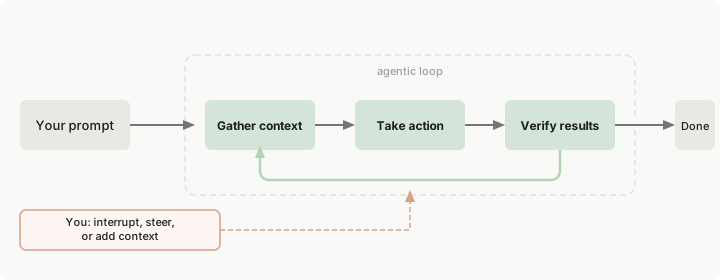
The agent harness is now publicly available as the Anthropic Agent SDK. The same loop that powers Claude Code can power your own custom agents. We'll learn creating custom agents in Operator course.
The three-phase agentic loop (Gather context, Take action, Verify results) runs inside an agent harness, the infrastructure layer that turns a language model into a coding agent - like our lovely Claude Code.
The language model generates text and makes decisions. The harness provides everything else: tools for reading and writing files, a permission system that gates destructive actions, a managed memory system, hooks for deterministic control, and the loop itself that keeps the agent iterating until the task is done or it needs your input.
Here is what loads into Claude's context window when you start a session:
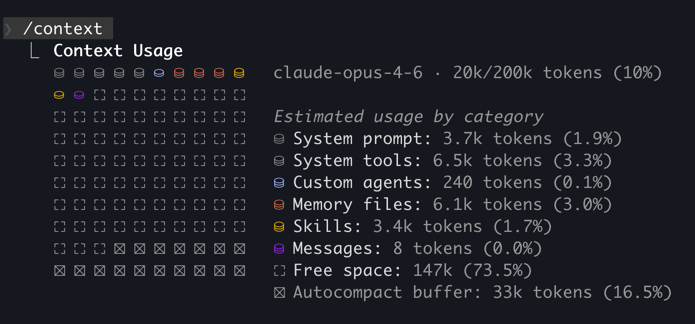
/context snapshot of a /new session -> ~16k tokens in code-agents.ai projectBefore you send your first message, roughly 10k+ tokens are already consumed by the system. With project memory added, MCP servers connected, and skills initialized that number can reach 50,000 or more.
This is not one monolithic system prompt. It is a modular instruction set, conditionally assembled based on your environment and configuration. The Piebald AI team extracts these prompts directly from the compiled Claude Code npm package and publishes them after each release. Over 110 prompt pieces across 100+ versions, fully accessible.
GitHub - Piebald-AI/claude-code-system-prompts: All parts of Claude Code's system prompt, 27 builtin tool descriptions, sub agent prompts (Plan/Explore/Task), utility prompts (CLAUDE.md, compact, statusline, magic docs, WebFetch, Bash cmd, security review, agent creation). Updated for each Claude Code version.
All parts of Claude Code's system prompt, 27 builtin tool descriptions, sub agent prompts (Plan/Explore/Task), utility prompts (CLAUDE.md, compact, statusline, magic docs, WebFetch, Bash cmd, ...
The deeper realization is that the agent harness is not just something you observe. It is something you program.
You program the agent harness declaratively: through configuration files, markdown documents, and JSON definitions. You then extend the declarations with imperative code of scripts to program hooks, MCP servers and skills.
The harness exposes five extension points:
| Extension Point | What You Write | What It Does | Programming Model |
|---|---|---|---|
| CLAUDE.md | Natural language rules | Shapes every decision the agent makes | Rule-based instructions |
| Hooks | JSON event config | Attaches deterministic logic to lifecycle events | Event-driven callbacks |
| Skills | Markdown files | Injects on-demand knowledge when relevant | Lazy-loaded modules |
| Custom Agents | Markdown files | Defines specialized agent personas with scoped tools | Agent-oriented composition |
| MCP Servers | JSON tool definitions | Extends capabilities with external tools and APIs | Capability declaration |
Think of the agent harness like a CI/CD pipeline. You do not write the build system. You declare stages, triggers, and checks. The agent harness works the same way: you declare rules, attach event handlers, define capabilities, and compose agents. The harness orchestrates everything.
Traditional software development is imperative, you write code that executes step by step. In our usage context, programming the agent harness is declarative: you describe WHAT the agent should know, WHICH workflow it should trigger, and WHAT tools it has access to. The harness handles the HOW and WHEN. You never write the agentic loop yourself imperatively, but you can set the stages for a loop cycle declaratively. You configure what happens at each stage of the loop, and let the models with the harness go with the flow.
Here is what each form of declarative programming looks like in practice:
## Design Principles

- **Single Responsibility** — each module/function does ONE thing
- **KISS** — choose the simplest solution that works
- **Loose Coupling** — layers communicate through well-defined contracts; no direct imports between UI and service internals
- **High Cohesion** — related code stays together
- **Minimal Change Surface** — new features touch ≤3–4 files
Natural language rules that shape every decision. Loaded every session.
{
  "hooks": {
    "PostToolUse": [
      {
        "matcher": "Write|Edit",
        "hooks": [{ "type": "command", "command": "bun run format" }]
      }
    ]
  }
}
JSON event config. Fires deterministically on every matching tool call.
---
name: input-validation
description: Zod validation patterns for this project
---

All external input MUST be validated with Zod.
Use safeParse in error-handling paths.
Markdown files. Loaded on demand when Claude determines they are relevant.
---
name: code-reviewer
description: Use this agent when you need to review recently implemented code for quality, cleanliness, and spec compliance.
model: opus
color: red
---

You are an elite Code Reviewer agent specializing in thorough, systematic code review for TypeScript projects.

Your expertise combines deep technical knowledge with an uncompromising commitment to code cleanliness and quality.

Review all uncommitted changes for: security issues, logic errors, and violations of CLAUDE.md conventions. This includes verifying that implementation follows the architecture plan, checking for leftover/dead code, running verification scripts, and ensuring all acceptance criteria are met.

Report findings by severity. Do not modify code.
Markdown agent definitions. Each runs in its own context with scoped tool access.
{
  "mcpServers": {
    "github": {
      "command": "npx",
      "args": ["-y", "@modelcontextprotocol/server-github"],
      "env": { "GITHUB_PERSONAL_ACCESS_TOKEN": "${GITHUB_TOKEN}" }
    }
  }
}
JSON tool definitions. Extends Claude's capabilities with external services and their tools.
You program the agentic loop via the workflows, and what happens at each stage of it. Rules, hooks, skills, agents, and tools: five forms of declarative programming for an AI coding agent.
This framing sets up the rest of the course. Each chapter from 3 through 10 teaches you one of these extension points until, by the capstone, you have a fully programmed agent system where every extension point reinforces the others.
The system prompts are not abstract configuration. They are the specific instructions that produce the agent behavior you observe in your terminal. No other educational content shows you these directly, so you're in for a treat :)
Here are the five most impactful prompt pieces, each paired with the behavior it produces.
This line comes from the "Doing tasks" system prompt. It is why Claude always reads files before editing them.
The same prompt also says:
Avoid over-engineering. Only make changes that are directly requested or clearly necessary. Keep solutions simple and focused. Don't add features, refactor code, or make 'improvements' beyond what was asked.This explains a behavior that frustrates some engineers: Claude either produces minimal changes when you expected a broader refactor, or on the other edge over-engineer/hack a solution to accomplish the task. It is following an instruction to keep the change surface small, but at the conflicting end it tries to accomplish a task.
There goes the non-deterministic behavior.
It comes from the "Executing actions with care" prompt. This is why Claude asks for confirmation before git push, rm -rf, or database operations.
The prompt explicitly categorizes risky actions:
rm -rfgit reset --hard, removing packagesThe instruction ends with: "measure twice, cut once." Claude is not being timid. It is following a safety protocol with specific categories of risk.
It comes from the "Tool usage policy" prompt. This is why Claude uses the Read tool instead of cat, Edit instead of sed, Glob instead of find.
The tool descriptions also instruct Claude to make independent tool calls in parallel, which is why you sometimes see multiple file reads happening simultaneously in a single turn.
It comes from the "Doing tasks (minimize file creation)" prompt.
The full instruction reads:
Do not create files unless they're absolutely necessary for achieving your goal. Generally prefer editing an existing file to creating a new one, as this prevents file bloat and builds on existing work more effectively.This is why Claude edits in place rather than generating new helper files for single-use operations.
The same monolithic "Tone and style" prompt also contained a "Professional objectivity" section:
Prioritize technical accuracy and truthfulness over validating the user's beliefs. Focus on facts and problem-solving, providing direct, objective technical info without any unnecessary superlatives, praise, or emotional validation. It is best for the user if Claude honestly applies the same rigorous standards to all ideas and disagrees when necessary, even if it may not be what the user wants to hear.This is why Claude occasionally pushed back on your approach instead of executing it blindly. And, you often got your well-deserved "You're (absolutely) right!" response back when you won an argument against them.
Worth noting: this instruction was dropped when the monolithic prompt was decomposed into granular files in v2.1.53. The behavior may still be present from model training, but it's no longer explicitly instructed.
When context compaction triggers (either automatically or via /compact), a separate prompt instructs Claude to write a structured continuation summary with five sections: Task Overview, Current State, Important Discoveries, Next Steps, and Context to Preserve.
This explains why compaction sometimes drops details you cared about. It is following a template that prioritizes actionability over completeness.
Knowing the template lets you guide compaction:
Run /compact "preserve the database migration sequence and the three failing test names" to influence what context survives.
Your CLAUDE.md extends these system instructions. When you write "Never use inline styles" in CLAUDE.md, it carries the same weight as "Never create files unless absolutely necessary" from the built-in system prompt.
The system prompts change with every Claude Code release. The Piebald AI repository tracks these changes in a detailed changelog, so you can see exactly what Anthropic modified between versions.
The links above are pinned to commit 7d00677 (v2.1.55) for stability of the content. The prompt files are reorganized frequently. To inspect the prompts for your installed version of Claude Code, run claude --version, then browse the Piebald AI repo at the corresponding tag or commit.
The next time Claude refuses to run a destructive command, or reads a file before editing it, or produces a minimal change when you expected more, check the system prompts and update your CLAUDE.md if you have to adjust the behavior. The behavior you observed is almost certainly an explicit instruction of which you have a complete understanding around now.
The system prompts tell Claude how to think. The tools are what Claude uses to act. Understanding both gives you the complete picture.
Claude Code's built-in tools fall into four categories:
| Tool | Category | Purpose | Description Cost |
|---|---|---|---|
| Read | Reading | Read files, images, PDFs, notebooks | ~469 tokens |
| Glob | Searching | Find files by name pattern | ~217 tokens |
| Grep | Searching | Search file contents with regex | ~389 tokens |
| Write | Writing | Create or replace entire files | ~186 tokens |
| Edit | Writing | Surgical string replacements in files | ~246 tokens |
| Bash | Executing | Run any terminal command | ~1,067 tokens |
| WebSearch | Research | Search the web for docs and errors | ~319 tokens |
| WebFetch | Research | Fetch and summarize web pages | ~297 tokens |
| ToolSearch | Meta | Discover and load deferred tools | ~144 tokens |
| Task | Delegation | Launch subagent for complex subtasks | ~1,200 tokens |
Every tool description consumes context tokens. The Bash tool alone costs ~1,067 tokens just for its description. With all built-in tools loaded, roughly 5-8% of your context window is consumed before you send your first message.
MCP tool definitions add more on top of that. When tool descriptions exceed 10% of the context window, Claude Code automatically defers tools and loads them on demand via ToolSearch. This is why you sometimes see Claude "discovering" tools mid-session rather than having them all available from the start.
Each tool has its own detailed description that Claude reads. For example, the Edit tool description tells Claude: "The edit will FAIL if old_string is not unique in the file." This is why Edit works the way it does:
// Claude specifies the exact text to find and the replacement

// old_string (what Claude finds in the file):
const user = await db.users.create({ email });

// new_string (what Claude replaces it with):
const validated = signupSchema.safeParse({ email, name });
if (!validated.success) {
  return { error: validated.error.flatten() };
}
const user = await db.users.create(validated.data);If the same string appears in multiple places, the edit fails and Claude automatically includes more surrounding context to clear up. This is one reason well-structured code with unique function names works better with AI agents than dense, repetitive code.
Chapter 1 introduced some user-visible subagents such as Explore, or Plan. The full picture is much larger.
Subagents are specialized AI assistants that handle specific types of tasks. Each subagent runs in its own context window with a custom system prompt, specific tool access, and independent permissions. When Claude encounters a task that matches a subagent’s description, it delegates to that subagent, which works independently and returns results.
Create custom subagents - Claude Code Docs
Create and use specialized AI subagents in Claude Code for task-specific workflows and improved context management.
Claude Code runs 20+ specialized system agents that fire automatically behind the scenes:
| System Agent | What It Does | When It Fires |
|---|---|---|
| Conversation summarization | Creates structured summaries during compaction | Auto-compaction or /compact |
| Session title generation | Generates terminal tab titles | Session start |
| User sentiment analysis | Detects frustration and adjusts behavior | Periodically during sessions |
| Bash command description writer | Generates human-readable command descriptions | After every Bash tool call |
| Command prefix detection | Detects command injection attempts | Before Bash execution |
| Prompt suggestion generator | Suggests follow-up prompts | When Claude finishes a task |
| WebFetch summarizer | Summarizes verbose web content | After WebFetch returns |
| Agent creation architect | Designs custom agent specifications | When creating a new agent |
| CLAUDE.md creation | Analyzes codebases to generate CLAUDE.md | /init or explicit request |
| Hook condition evaluator | Evaluates prompt-type hook conditions | When prompt hooks fire |
These hidden agents explain behaviors that seem magical.
The user-visible subagents, and one key system agent are more interesting once you read their actual system prompts:
From the Explore agent prompt:
You are a file search specialist. You are STRICTLY PROHIBITED from creating, modifying, deleting files. Your role is EXCLUSIVELY to search and analyze existing code.Explore runs on Haiku (18.75x cheaper than Opus). When Claude needs to find a file or search for a pattern, it often delegates to Explore rather than consuming main-session context and budget. This is automatic.
From the Plan agent prompt:
You are a software architect and planning specialist. Your role is EXCLUSIVELY to explore the codebase and design implementation plans. You do NOT have access to file editing tools.Plan inherits the main session's model. It explores, designs, and outputs a step-by-step implementation strategy with critical files listed. It cannot modify anything.
From the Agent Creation Architect prompt:
You are an elite AI agent architect specializing in crafting high-performance agent configurations. Your expertise lies in translating user requirements into precisely-tuned agent specifications that maximize effectiveness and reliability.This system agent fires when you create a custom agent (Chapter 8). It analyzes your requirements, designs an expert persona, and outputs a structured specification: identifier, usage triggers, tool access, and a full system prompt.
Claude Code is not one agent. It is an orchestrator running 20+ specialized agents behind the scenes. The three you see above (Explore, Plan, Agent Creation Architect) are the tip of the iceberg.
Ask Claude to edit a function in one of your files. Watch the Edit tool call: you will see the exact old_string Claude matched and the new_string it replaced. If the edit fails with "old_string is not unique," Claude will automatically include more surrounding context and retry.
Then ask Claude to find all test files in this project. Watch for the "Launching agent" indicator in your terminal. That is the Explore subagent, running on Haiku, following its own read-only system prompt at a fraction of the main session's cost.
You now know the instructions, the tools, and the agents. The final piece is watching all of them work together on a real task.
Here is a concrete example: you ask Claude Code to "add input validation to the auth form".
Watch the tool call names in your terminal. After a few sessions, you will start recognizing patterns: Claude almost always reads before writing, searches before reading, and runs verification after every edit. These are not habits, they are instructions.
Try this yourself. Open Claude Code in any project and ask it to make a small change, and inspect the debug logs output.
claude --debug "api,hooks,mcp" --verbose "add input validation to the auth form"Before Claude responds, predict three things: which files it will read first, what tool call it will use to search, and what verification command it will run after the edit. After a few sessions, your predictions will be more accurate.
System prompt assembly (10 components, ~10K+ base tokens):
| Component | Tokens | Purpose |
|---|---|---|
| Core system prompt | ~3,000 | Identity, capabilities, behavioral rules |
| Tool descriptions | ~4,500 | Read, Write, Edit, Bash, Glob, Grep, etc. |
| Tool usage policy | ~800 | When to use which tool, parallel execution |
| Task execution | ~600 | "Never propose changes to code you haven't read" |
| Safety instructions | ~500 | "Measure twice, cut once" |
| Tone and style | ~400 | Short responses, professional objectivity |
| CLAUDE.md (global + project) | Variable | Your rules and conventions |
| MCP tool definitions | 0-50K | Connected external tools |
| Conditional prompts | Variable | Git status, hooks, skills, plan mode |
Key behavioral instructions and what they produce:
| Instruction | Source Prompt | Observable Behavior |
|---|---|---|
| "Never propose changes to code you haven't read" | Doing tasks | Claude reads files before editing |
| "Carefully consider reversibility and blast radius" | Executing actions with care | Claude asks confirmation for destructive commands |
| "Use specialized tools instead of bash commands" | Tool usage policy | Claude uses Read/Edit/Glob instead of cat/sed/find |
| "Never create files unless absolutely necessary" | Tone and style | Claude prefers editing existing files |
| "Prioritize technical accuracy over validating beliefs" | Professional objectivity | Claude pushes back on incorrect approaches |
Declarative programming model (5 extension points):
| Extension Point | File Format | Programming Model | Course Chapter |
|---|---|---|---|
| CLAUDE.md | Markdown | Rule-based instructions | Chapter 3 |
| Hooks | JSON | Event-driven callbacks | Chapter 5 |
| Skills | Markdown | Lazy-loaded modules | Chapters 4+ |
| Custom Agents | Markdown + YAML | Agent-oriented composition | Chapter 8 |
| MCP Servers | JSON | Capability declaration | Chapter 6 |
Core tool inventory:
| Tool | Purpose | Description Cost |
|---|---|---|
| Read | Read files, images, PDFs | ~469 tokens |
| Glob | Find files by pattern | ~217 tokens |
| Grep | Search contents with regex | ~389 tokens |
| Write | Create/replace files | ~186 tokens |
| Edit | Surgical string replacement | ~246 tokens |
| Bash | Run terminal commands | ~1,067 tokens |
| WebSearch | Search the web | ~319 tokens |
| Task | Launch subagents | ~1,200 tokens |
Inner loop (what happens on each turn):
You can now read Claude Code from the inside out. You understand how its context is built, what behavioral rules shape every response, which tools it reaches for and when, how it spins up subagents, and where the five extension points let you adjust the harness to your workflow.
You can predict what Claude Code will do before it does it, and explain why.
But prediction without a running engine is just theory. Chapter 3 gets Claude Code installed on your machine, authenticated, connected to your IDE, and configured with your first CLAUDE.md. That is the first of five extension points, and the one that shapes every session from the moment you write it.
How is this chapter?