Introducing code-agents.ai: why a premium agentic coding course?
 Önder Ceylan|
The AI coding revolution has a dirty secret: code generation is the easy part.
Every week I see the same headline. "AI writes 30% of all new code at [Big Tech Company]." "Claude Code hits $2.5B run-rate." "Developers 10x more productive with AI." The numbers are real. But they hide a problem that nobody wants to talk about.
The gap between "AI writes code" and "AI ships production software" is enormous. And most engineers are stuck in that gap right now, generating code that looks right, passes a quick glance, and then breaks in production.
I built code-agents.ai to close that gap. This post explains the problems I kept hitting, and how the course solves each one.
The data is clear: something is wrong
Before I list the problems, look at the numbers.
GitClear's 2024 study found an 8x increase in code duplication in AI-assisted codebases. Their 2025 follow-up showed copy-pasted code rose from 8.3% to 12.3%, while refactoring collapsed from 25% to under 10%. AI agents generate more code. Engineers clean up less of it.
METR's 2025 study measured experienced developers working 19% slower with AI, while believing they were 20% faster. The confidence gap is the real danger.
SonarSource surveyed developers and found that 96% don't fully trust AI-generated code. Yet only 48% actually verify it before committing.
These are not fringe studies. This is the state of AI-assisted development in 2026. More code, less quality, and a false sense of speed.
"AI-generated code without verification is a liability. AI-generated code with verification is a superpower."
Problem 1: Your agent forgets what you told it
You spend 20 minutes explaining the architecture. The agent follows your instructions perfectly for three tasks. Then on the fourth, it ignores everything and starts from scratch.
This is context rot. As the context window fills up, the model gets worse at finding and following earlier instructions. Opus 4.6 scores 93% accuracy at 256K tokens but drops to 76% at 1M tokens. Your agent is not ignoring you on purpose. It literally cannot find what you said earlier.
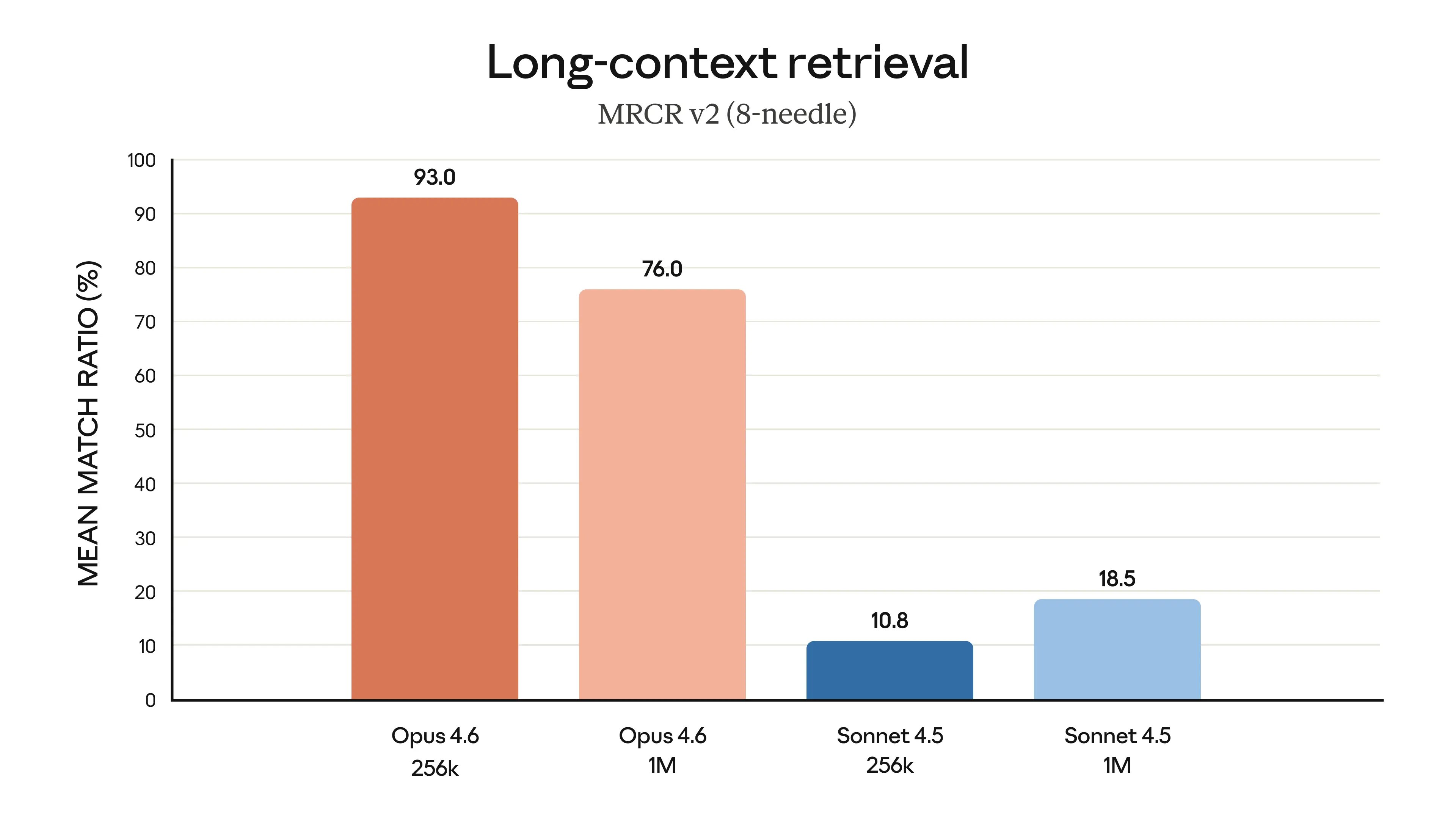
The course teaches context engineering in Chapter 9: the Document-and-Clear pattern, HANDOFF.md files for session continuity, the 60% threshold rule, and practical techniques to keep your context window clean. You learn to treat context like RAM, not like a bottomless notepad.
Problem 2: AI hallucinates APIs and invents libraries
The agent writes a clean function call to an API endpoint that does not exist. It imports a library method that was renamed two versions ago. It generates code that type-checks against types it made up.
Hallucination is not a bug. It is the default behavior. The model generates the most likely next token, and sometimes the most likely token is wrong.
The fix is a research phase before any code generation. Chapter 8 teaches a five-phase SDLC workflow where research comes first, always. You learn to wire up Context7 MCP for live documentation lookups, use read-only Explore subagents to verify API surfaces, and force the agent to cite its sources before writing a single line.
Problem 3: AI generates slop
"Slop" is the industry term for AI-generated code that technically works but is bloated, inconsistent, and unmaintainable. Code with TODO comments where real logic should be. Functions that duplicate existing utilities. Variable names that drift from your project conventions.
GitClear's data backs this up: refactoring rates collapsed as AI adoption grew. Engineers accepted AI output without cleaning it up. The codebase got worse, not better.
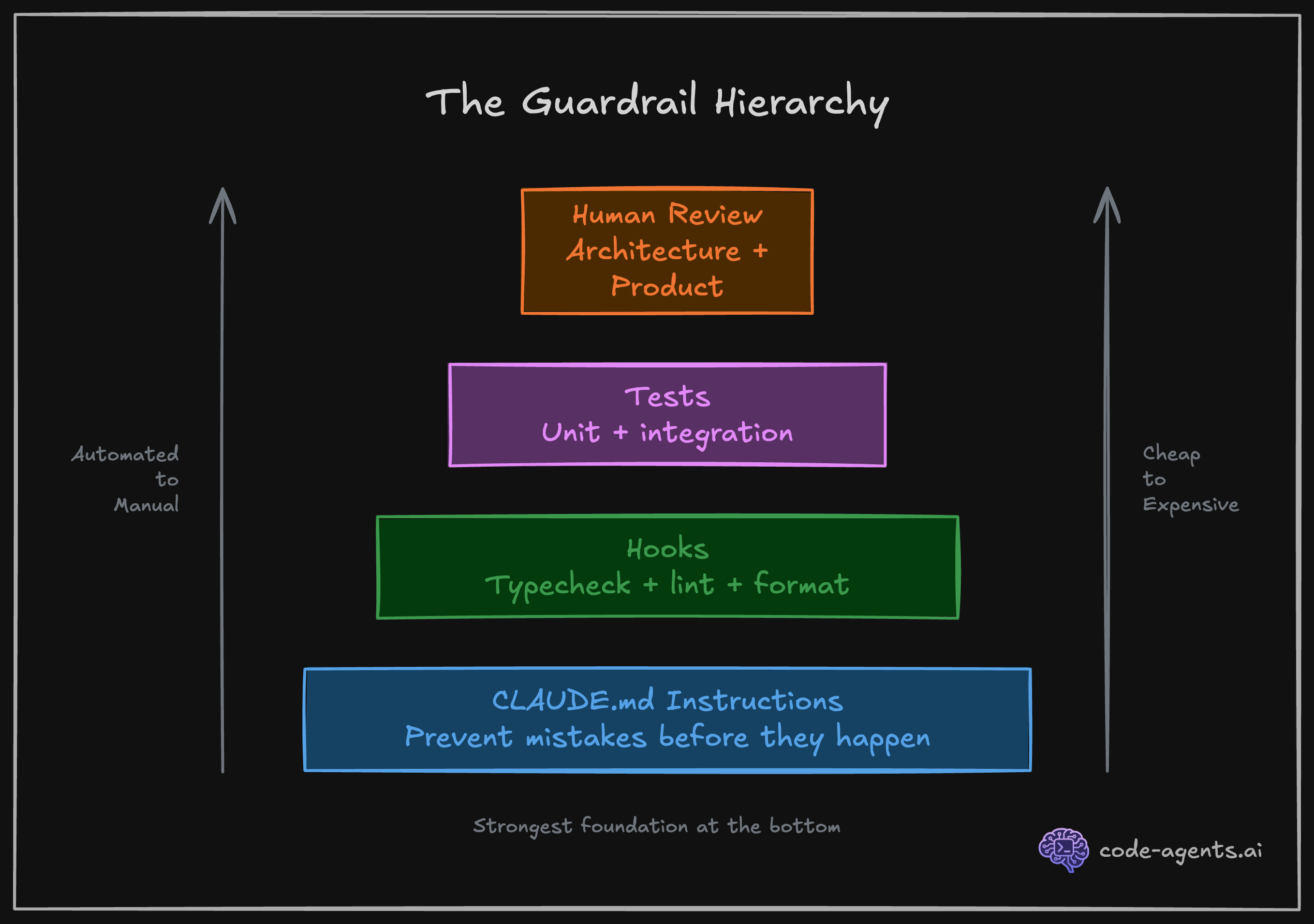
The course addresses this with guardrails. Chapter 1 introduces the concept, and Chapter 5 goes deep: CLAUDE.md rules, modular rule files, and deterministic hooks that run automatically after every file edit.
"Non-deterministic rules tell Claude what to do. Deterministic hooks make sure it actually does it."
Here is what a real hook configuration looks like. This runs type checking and formatting after every file write, and blocks the agent from stopping if tests or build fail:
{
  "hooks": {
    "PostToolUse": [
      {
        "matcher": "Write|Edit",
        "hooks": [
          { "type": "command", "command": "npx tsc --noEmit --pretty 2>&1 | head -20 || true" },
          { "type": "command", "command": "npx prettier --write . --log-level error 2>&1 || true" }
        ]
      }
    ],
    "Stop": [
      {
        "hooks": [
          {
            "type": "command",
            "command": "pnpm test 2>&1 && pnpm build 2>&1 || echo '{\"decision\": \"block\", \"reason\": \"Tests or build failed.\"}'"
          }
        ]
      }
    ]
  }
}
The agent cannot merge code that breaks. Not because you asked nicely. Because the system enforces it.
Problem 4: AI breaks code that already works
You ask the agent to add a feature. It adds the feature and silently breaks two existing ones. You don't notice until a user reports it, or until CI catches it (if you're lucky).
This is the verification problem. The agent does not know what "working" looked like before it started. It has no baseline to protect.
Chapter 7 solves this with TDD as the quality gate. You write the tests first. The agent writes the implementation. If existing tests break, the agent knows immediately and fixes the regression before moving on.
"Coverage is not a vanity metric when it gates completion. It is a contract between you and Claude about what 'done' means."
As Addy Osmani puts it: "The best results come when you apply classic software engineering discipline to your AI collaborations." TDD is not new. But applying it as an agentic quality gate changes everything. In my experience, TDD-first agentic workflows produce 60-70% fewer revision cycles.
Problem 5: AI does not write secure code
The agent adds a route handler without input validation. It stores tokens in local storage. It builds SQL queries with string concatenation. It skips authorization checks because "we can add those later."
Security is not the agent's priority. Shipping code fast is. Unless you build security into the system, it will be an afterthought.
Chapter 4 and Chapter 5 teach you to set up PreToolUse hooks that block dangerous commands, permission deny lists that prevent the agent from touching sensitive files, and security-reviewer subagents from Chapter 8 that audit code before it merges.
Problem 6: Prototyping works, but scaling fails
The demo looks great. You show it to your team. Then you try to add the second feature, and everything falls apart. The agent's approach does not scale because it optimized for "make this work right now," not "make this maintainable."
The course teaches feedback loops in Chapter 6 and structured SDLC in Chapter 8. Visual verification through browser MCPs catches what type checkers miss. The five-phase workflow prevents the "just ship it" trap that creates technical debt.
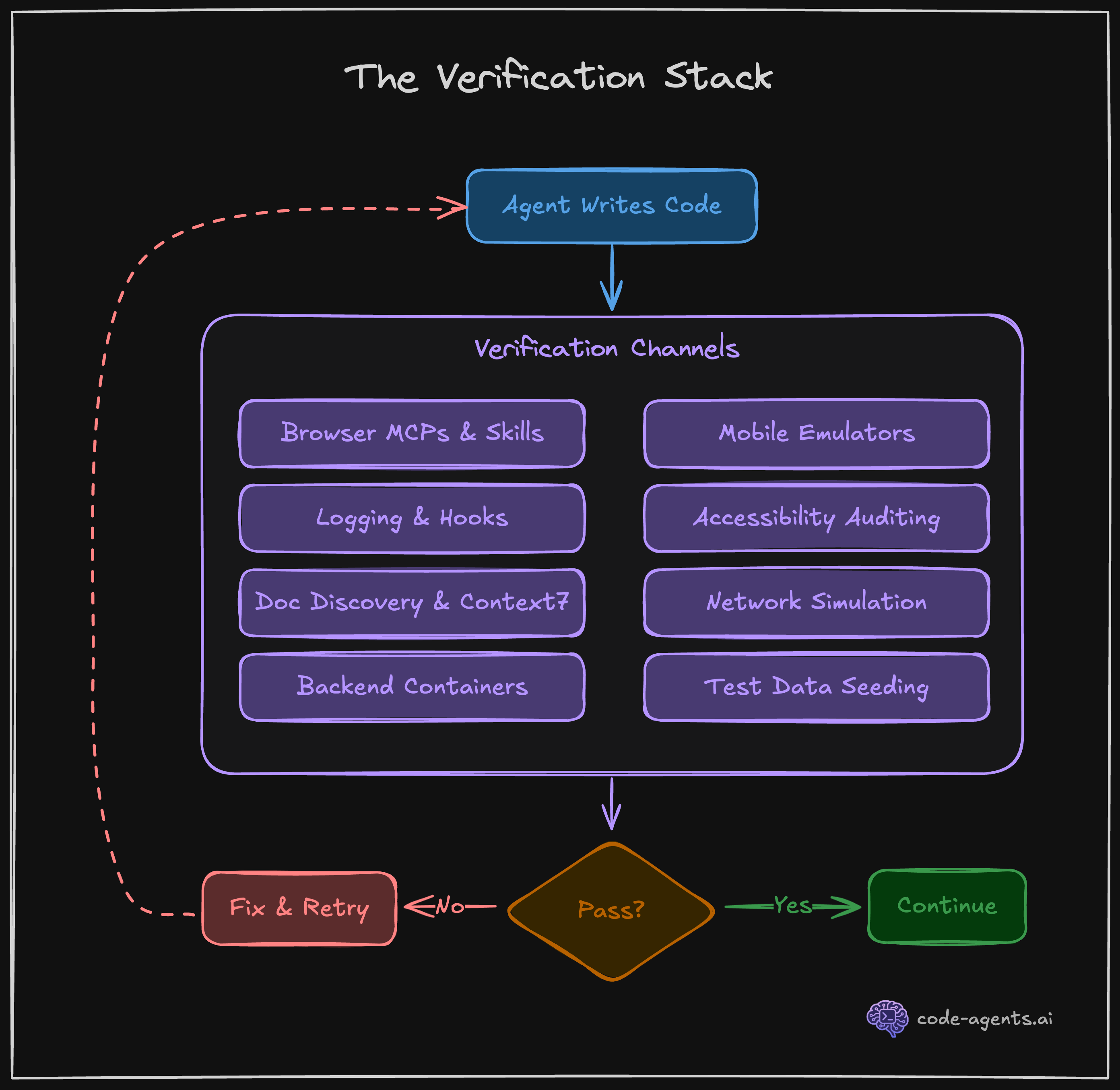
"The 'prove to me this works' pattern transforms Claude from a code generator into an agent that iterates until the output is correct."
Boris Cherny, the creator of Claude Code, shipped 259 PRs with 40,000+ lines in 30 days. 100% written by Claude Code with Opus. He did not do this by typing faster. He did it with a structured workflow and verification at every step.
Problem 7: Your agent is expensive by default
An unchecked Opus session can burn through $50-100+ in a single sitting. Most of that spend is wasted on context that the model can barely use.
Here is the reality of your context budget:
System prompt:        ~6,000 tokens  (3%)
CLAUDE.md:            ~4,000 tokens  (2%)
MCP tool definitions: ~30,000 tokens (15%)
Allowed tools list:   ~3,000 tokens  (1.5%)

Overhead before work: ~43,000 tokens (21.5%)
Effective working:    ~157,000 tokens
Over 20% of your context is gone before the agent writes a single line. Chapter 9 teaches context and cost engineering: model selection (Haiku is 18.75x cheaper than Opus for routine tasks), the Document-and-Clear workflow, skill scripts that load context on demand instead of permanently, and git worktrees for parallel sessions.
The average developer spends $6/day on AI coding tools. 90% stay under $12/day. The course teaches you how to stay in that range while running autonomous sessions.
Problem 8: The SDLC does not disappear with AI
Some engineers believe AI agents remove the need for process. Research, planning, review: all unnecessary when the agent can "just build it."
The data says otherwise. Anthropic's internal research shows that employees who adopted a structured AI workflow went from 28% daily AI usage to 59%, with productivity gains jumping from +20% to +50%. Structure did not slow them down. It removed the rework that slowed them down.
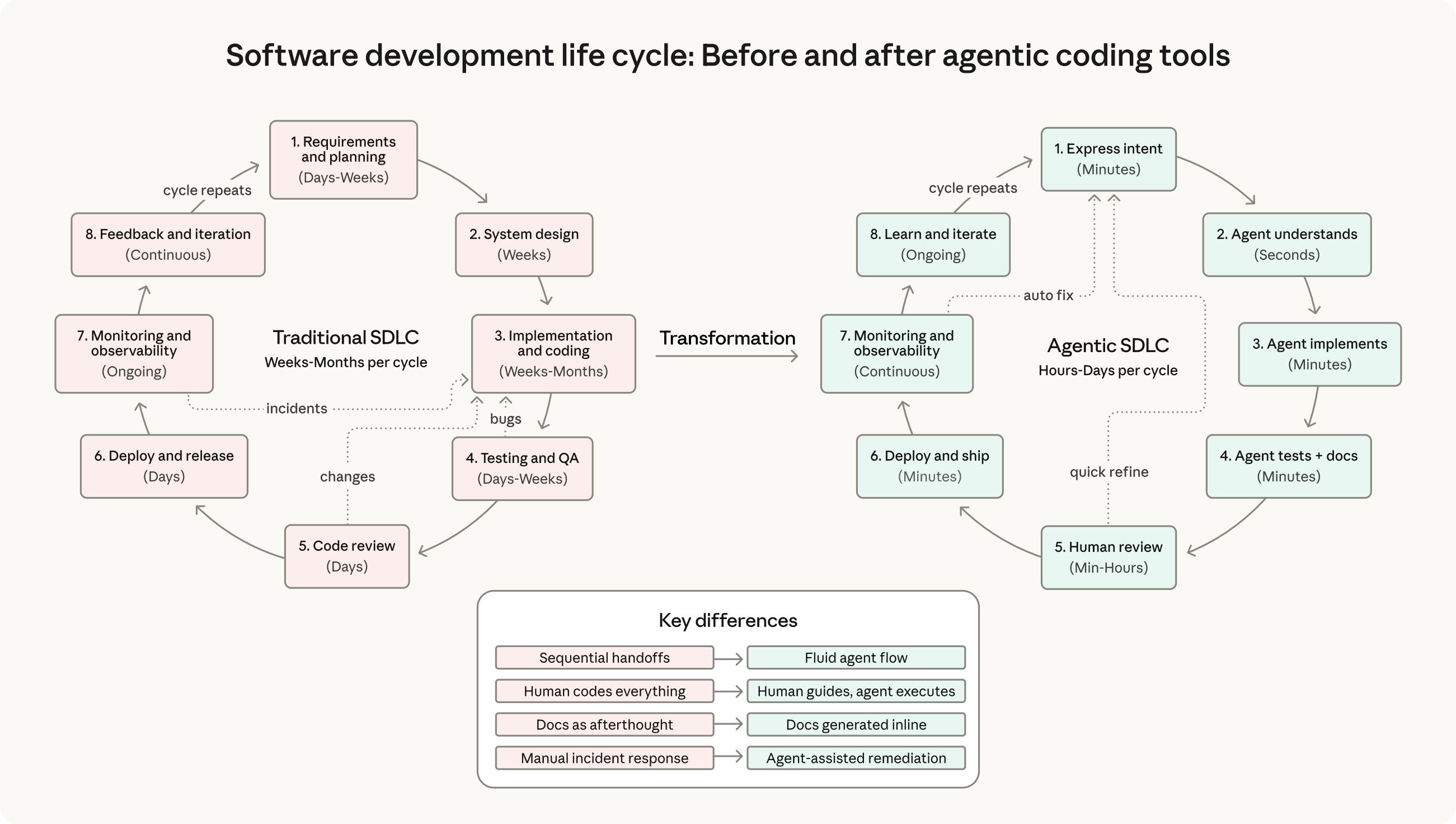
"A structured workflow does not slow you down. It prevents the rework that slows you down."
Chapter 8 maps the full five-phase agentic SDLC: Research, Plan, Implement, Review, Ship. Each phase has specific techniques, subagent configurations, and quality gates. No phase gets skipped.
Problem 9: You are still the driver
The agent needs you for everything. Every permission prompt breaks your flow. Every ambiguous requirement needs a clarification. You spend more time supervising the agent than you would spend writing the code yourself.
Chapter 10 teaches commands, skills, and autonomous loops. You build reusable slash commands that encode your workflow. You create skills that make any library AI-native. You set up one-shot prompting workflows where you hand off a task before bed and wake up to a completed PR with all quality gates passing.
This is the end state: an agent that runs your system, not an agent that needs you to hold its hand.
What the course covers
The Essentials tier is 10 chapters that take you from zero to a fully configured Claude Code environment with TDD pipelines, custom skills, and autonomous task loops. You apply everything to your own project, not toy examples.
Here is what Boris Cherny, the creator of Claude Code, says about the approach:
"Probably the most important thing to get great results is to give Claude a way to verify its work. If Claude has that feedback loop, it will 2-3x the quality of the final result."
The entire course is built around that principle. Every chapter adds another layer of verification, another feedback loop, another guardrail. By the end, your agent does not just generate code. It verifies, tests, and ships production-grade software.
Start free
Chapters 1 through 3 are free. No credit card. No trial period. You get the foundational mental model, understand how Claude Code works under the hood, and set up your environment.
If the problems in this post sound familiar, start the course and see how the system works. The free chapters will show you whether this approach fits how you work.